


당사와 관련된 최신 뉴스 및 공지사항을 확인하실 수 있습니다.


KR
당사와 관련된 최신 뉴스 및 공지사항을 확인하실 수 있습니다.

2023-04-19

존경하는 고객님:
안녕하세요, 다가오는 4월 연휴의 영향으로 PU Prime의 거래 시간이 조정될 예정입니다.
아래 표를 참고하여 거래중인 시장과 상품의 자세한 내용을 확인하시길 바랍니다:

*모든 시간은 GMT+3 (MT4/MT5) 의 서버 시간으로 제공됩니다.
시장에서 유동성이 감소할 경우 스프레드가 평소보다 크게 증가할 수 있다는 점 참고하시기 바랍니다.
질문이 있거나 도움이 필요한 경우 라이브 채팅, 이메일[email protected] 을 통해 지원팀에 문의하시기 바랍니다.
감사합니다!
PU Prime 그룹

2023-04-13
고객님께 :
아래의 지수CFD 상품 배당금은 향후 일정에 따라 조정될 예정입니다. 지수CFD에 대한 상세내용은 배당금 지급일 전날 마감 후, 잔액 부분에 “Div &<거래상품명>&<순 거래량>”형식으로 표시됩니다.
자세한 사항은 아래의 표를 참고해주시기 바랍니다.
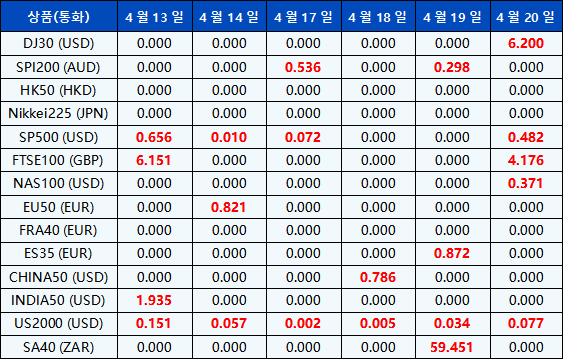
*상기 날짜는GMT+3 (MT4/MT5 서버시간) 임을 유의하시기 바랍니다.
위의 내용은 변경될 수 있으며, 자세한 내용은 MT4/MT5를 참조하십시오.
질문이 있거나 도움이 필요한 경우 실시간 채팅, 이메일일 [email protected] 으로 문의해 주시면 감사하겠습니다.그물
감사합니다.
PU Prime그룹
2023-04-7
고객님께 :
안녕하세요, PU Prime 4월물 선물 상품의 만기일이 다가옵니다. 선물 상품은 월물 계약 사이에 가격 차이가 발생 하므로잠재적인 거래 위험을 피하기 위해 포지션을 적절하게 관리 할 것을 건의드립니다.
선물 계약의 롤오버 일정은 다음과 같습니다:

*모든 시간은 GMT+3으로 제공됨 (MT4/MT5 서버 시간)
주의사항:
만약, 문의사항이 있으시거나 도움이 필요하시다면, 실시간 채팅, 이메일 [email protected].
감사합니다.
PU Prime그룹
2023-04-6
고객님께 :
아래의 지수CFD 상품 배당금은 향후 일정에 따라 조정될 예정입니다. 지수CFD에 대한 상세내용은 배당금 지급일 전날 마감 후, 잔액 부분에 “Div &<거래상품명>&<순 거래량>”형식으로 표시됩니다.
자세한 사항은 아래의 표를 참고해주시기 바랍니다.
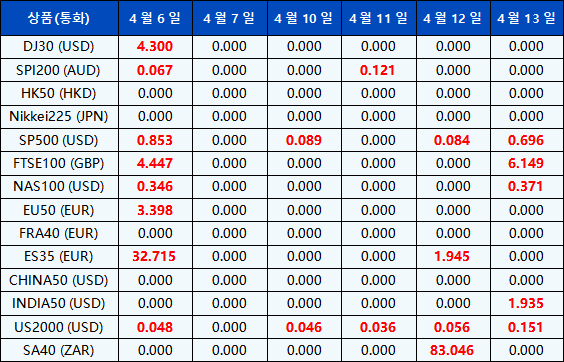
*상기 날짜는GMT+3 (MT4/MT5 서버시간) 임을 유의하시기 바랍니다.
위의 내용은 변경될 수 있으며, 자세한 내용은 MT4/MT5를 참조하십시오.
질문이 있거나 도움이 필요한 경우 실시간 채팅, 이메일일 [email protected] 으로 문의해 주시면 감사하겠습니다.그물
감사합니다.
PU Prime그룹
2023-04-4
Dear Valued Client,
PU Prime would like to remind you that we have recently completed a server upgrade to provide an enhanced trading environment for all our clients. The upgrade was carried out on 18 March 2023, from 00:00 hrs. (GMT+3) until 05:00 hrs. (GMT+3).
As a result of the upgrade, the MT4/MT5 account server name has been changed as follows:
–PacificUnionLLC-Live to PUPrime-Live
–PacificUnionLLC-Live 2 to PUPrime-Live 2
–PacificUnionLLC-Live 3 to PUPrime-Live 3
–PacificUnionLLC-Demo to PUPrime-Demo
Please follow the following methods and steps below to log in to your account again
1. MT4/MT5 for Mobile (Existing User)
Note: If you are unable to find PUPrime-Live/PUPrime-Live 2/PUPrime-Live 3 or PUPrime-Demo, please uninstall and reinstall the current version from Google Play Store/Apple App Store or our official website:
https://www.puprime.net/trading/trading-platforms/trading-app/2.MT4/MT5 for PC
Please note that these are the only server options available for all our clients. We highly recommend that you update your trading platforms with the new server names to ensure uninterrupted trading activities.
If you forget your MT4/MT5 Account password, visit https://myaccount.puprime.com/login to log in to the Client Portal to click the “Reset MT4/MT5 Password” field in the account on the main page.
Should you have any questions or require any assistance, please contact our support team via Live Chat or email: [email protected].
